Soon Strutrix Studio is coming to the Microsoft Store: 3D frame analysis and AISC 360-22 steel design, free to start. Be told when →

3D frame analysis & steel design · Windows

Steel frames in 3D, analysed and designed end to end.

Strutrix Studio analyses and designs three-dimensional frames: buildings, industrial structures, pipe racks, towers, trusses and transmission poles. It solves every load combination to first order or by the AISC 360-22 direct analysis method, checks every steel member by LRFD or ASD, chooses the lightest sections that pass, and audits every result's equilibrium on its own.

  • Direct analysis included
  • LRFD and ASD
  • No sign-up
  • Works offline
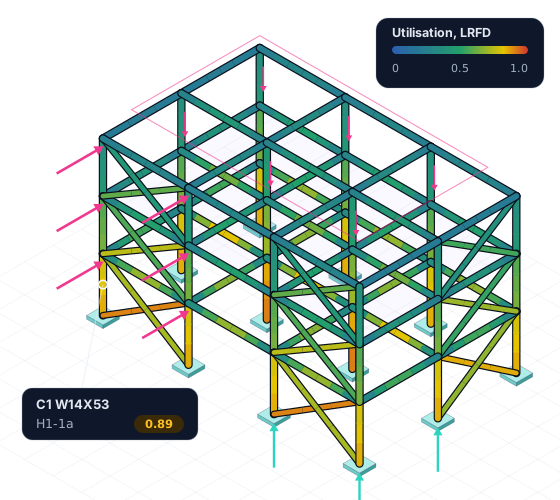
Illustration of a three-storey braced steel building frame on fixed supports, every column, beam and brace coloured by its AISC 360-22 utilisation, under wind on one face and a load on its roof, the governing column called out with its ratio and clause, and the reactions passed down to the foundations.
Sample Building Frame — Strutrix Studio
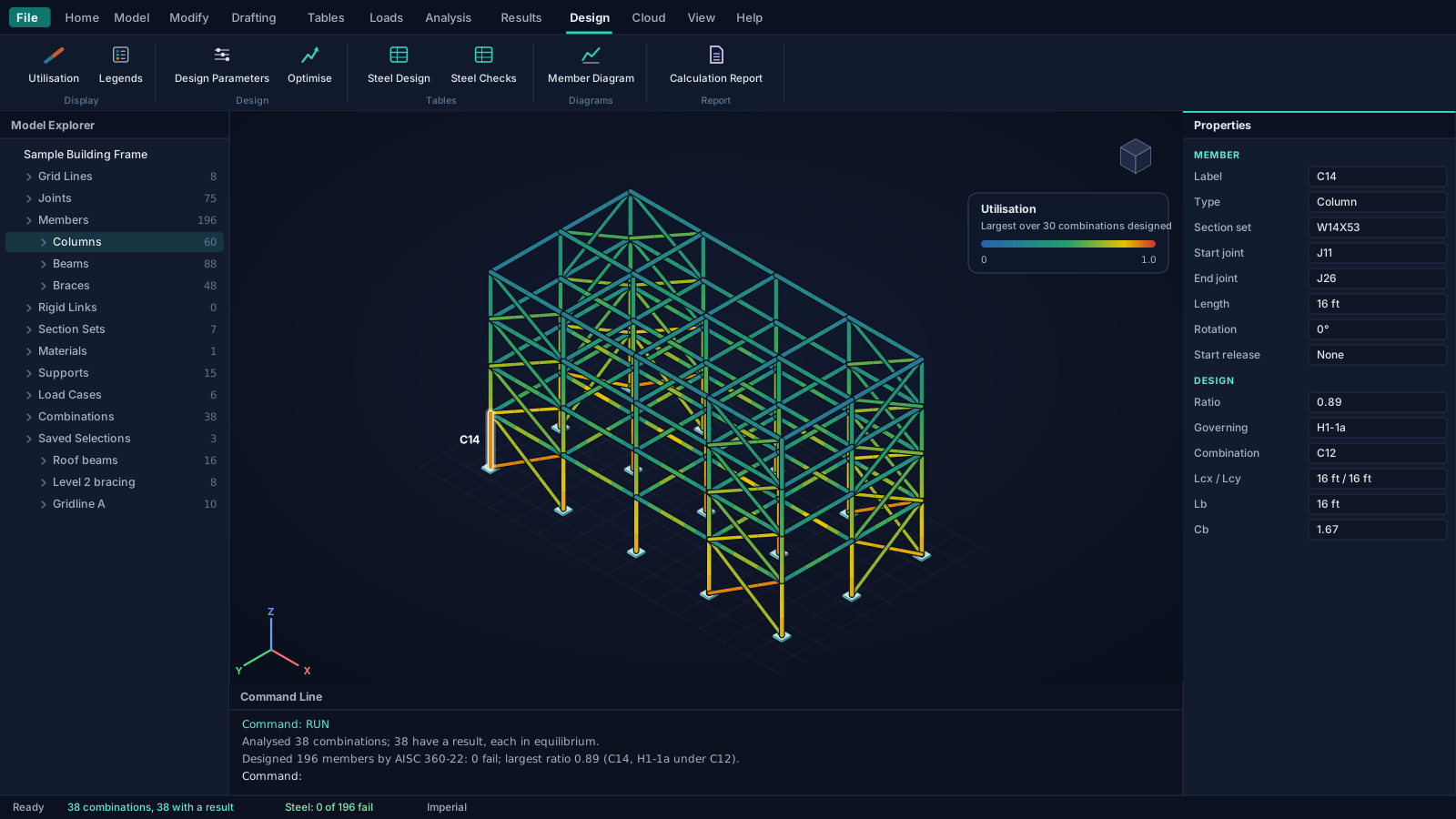
Illustration of the Strutrix Studio window: a four-storey braced steel building in 3D, every member coloured by its AISC 360-22 utilisation, the selected column's properties and design result in the Properties pane, the Model Explorer listing the model, and the command line reporting the run and the design.
Free · no account

Model, analyse and design a frame. No sign‑up. No subscription.

The 3D model, every kind of load, the ASCE 7-22 combinations, first-order and direct analysis, the AISC 360-22 steel design and the calculation report are free. They need no account, and they work offline. Sign in only when you want the cloud or the Pro features.

  • No account to create

    Install, open and model. Nothing asks for an email address before you can work.

  • No trial clock on the free part

    The free capabilities are not a time-limited trial. Nothing counts down and there is nothing to cancel.

  • Works offline

    The analysis and the design run on your computer, on every core it has. No connection is needed to model, run or design.

  • Your work stays yours

    No telemetry, analytics or advertising. Local models are plain-text .strx files you keep and can put under version control.

Any frame, in three dimensions

Draw it member by member, or generate it from a few dimensions.

Anything you can describe as joints and members, in any arrangement in space. The Generate menu builds the common ones whole, with their supports, as one step you can undo, and what it builds is an ordinary model you edit like any other.

  • Free

    Building frames

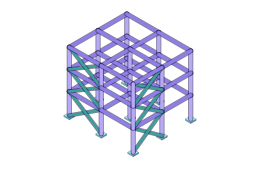
    Bays along X and Y and storeys of any heights, a column at every grid point, beams both ways, and diagonal or X bracing in the end bays.

  • Free

    Trusses

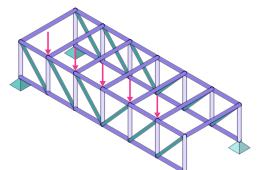
    Pratt, Howe and Warren parallel-chord trusses, every chord, vertical and diagonal a member of its own, on a pin and a roller.

  • Free

    Portal frames

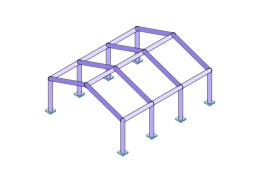
    Flat or pitched portals side by side, joined by struts at the eaves and the ridge, on fixed or pinned bases.

  • Free

    Circular grids

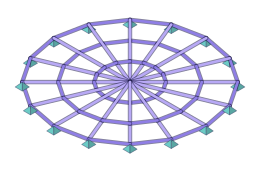
    Rings and radial members in a level plane, round a whole circle or through an arc, from a hub or an inner ring.

  • Pro

    Transmission poles

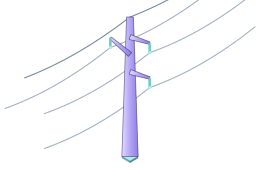
    A tapered tubular pole in shafts with slip joints, davit arms on one side, both or alternating, and its conductors and ground wire.

  • Pro

    H-frames

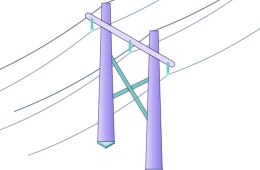
    Two tapered poles, a cross-arm and an X-brace between them, with the three phases and both ground wires attached.

Frames of members, static loads, elastic members. Version 1 analyses members only: a floor or a wall enters as the loads it delivers to them. Dynamics and material nonlinearity are outside it; the limits are stated plainly on the features page.

Built on the documents you sign against

  • AISC 360-22
  • ASCE 7-22
  • AISC Shapes Database v16.0
  • ASCE/SEI 48-19
  • ASCE MOP 113
  • ASCE MOP 74
  • NESC IEEE C2-2023
  • IFC 4.3

What it does, free

Every member, under every combination, from one model.

Build the structure once. Every load combination is analysed by the method you choose for it, every steel member is checked at points no more than six inches apart under every combination designed, and every result is audited for equilibrium by a separate calculation.

Model

Draw it as it is built, with drafting precision.

Enter each member end to end, however many others meet it along the way: the program divides it at every joint on its line and every crossing, and reports it whole. Set-out grid lines, work planes on any floor, snaps and typed coordinates put every joint where it belongs.

  • Supports fixed, pinned or held degree by degree, on springs or one-way springs, and settlements imposed per load case
  • End releases and partial fixity, rigid end offsets and rigid links, tension-only and compression-only members
  • Move, copy, array, rotate, mirror, scale, split, merge, extend and trim, each one step you can undo
  • The model checks itself before it runs, naming the joint or member: a part on no support, a near miss, a load drawn twice
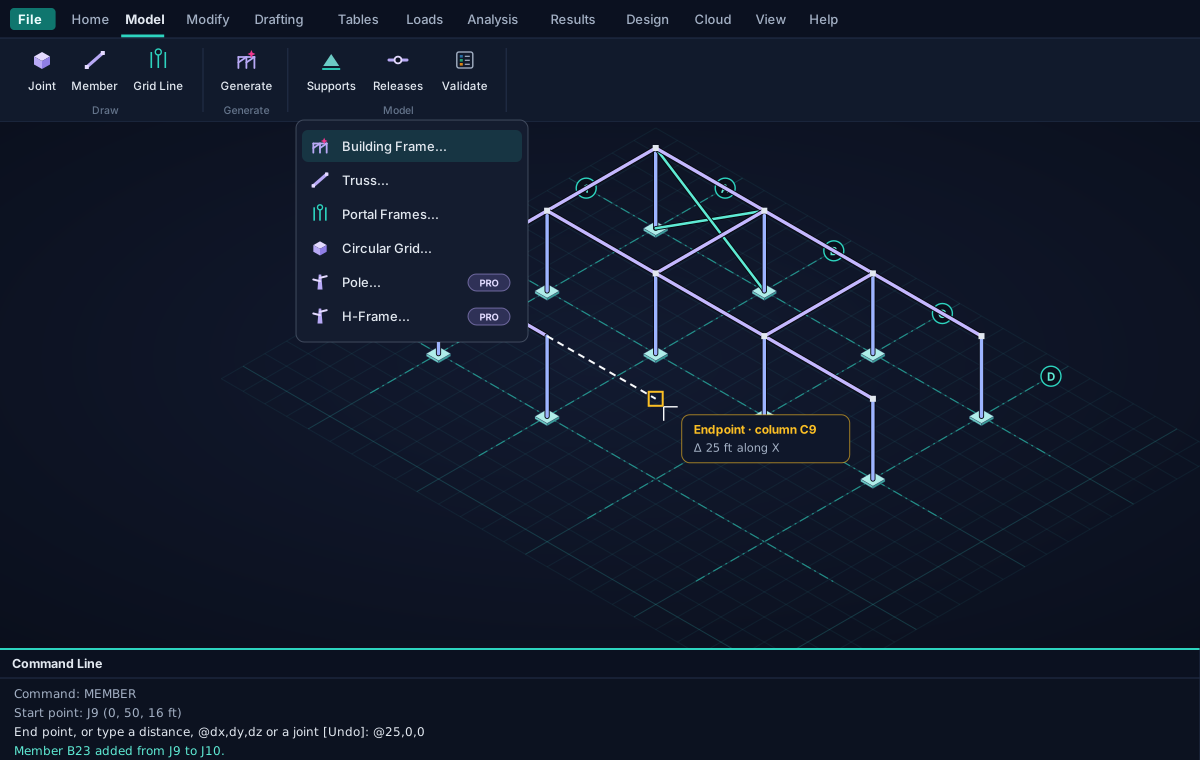
Model · Draw and generate
Illustration of modelling in the Studio: the drafting grid with set-out grid lines A to D and 1 to 3, two braced frames drawn, a new member being drawn to a snapped endpoint with its distance shown, the Generate menu open on its six generators, and the command line.

Loads

Loads where they act. Combinations by ASCE 7-22.

Loads go in basic load cases, each in its ASCE 7-22 category. A load inside a member is applied exactly where it is, never moved to a joint, and an area load is spread over the members around each panel, one way or two, as exact distributed loads.

  • Joint, point and distributed loads, projected loads, area loads, thermal loads and self-weight
  • The ASCE 7-22 strength and allowable stress combinations generated, each named after its row
  • Every lateral case in each of its senses, with ρ, the vertical seismic effect and the 100%/30% rule when asked
  • Notional loads worked from each combination's own gravity loads, as the direct analysis method asks
  • ASCE 7-22 §2.3
  • §2.4
  • §12.4.2.2
  • §12.5
  • AISC 360-22 C2.2b
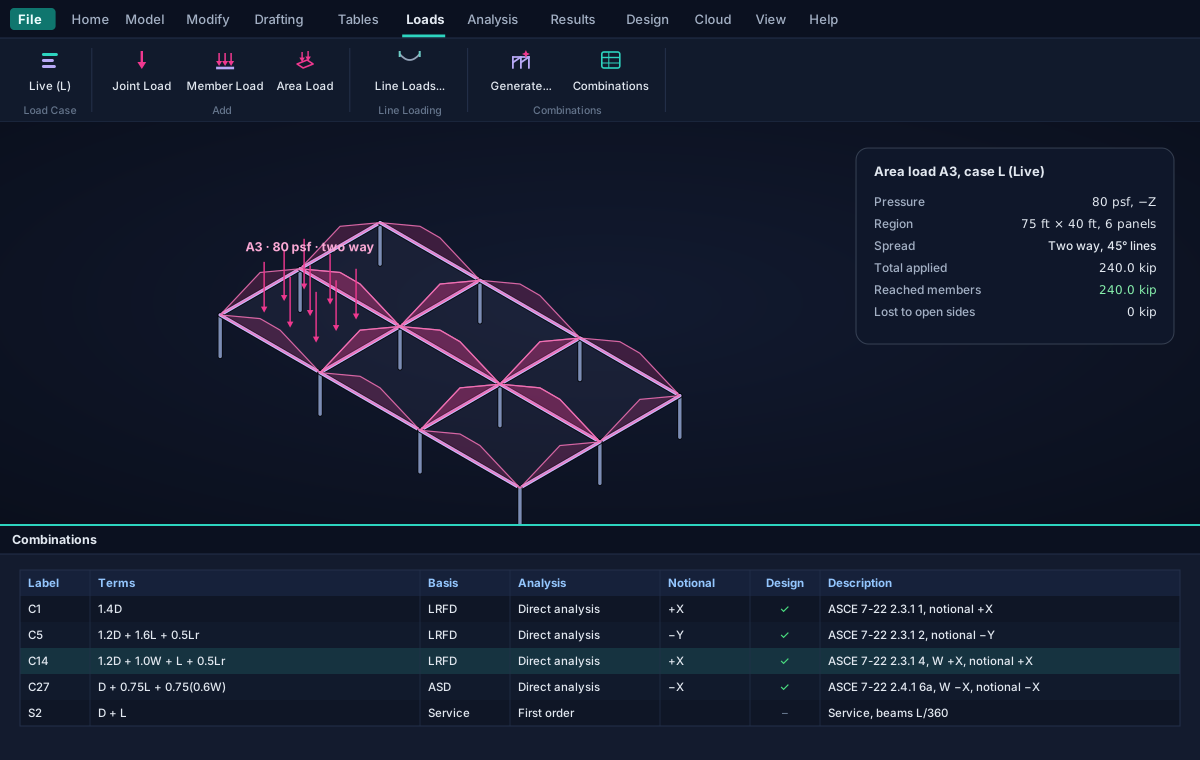
Loads · Area loads and combinations
Illustration of an 80 psf area load over a framed floor of six panels, spread two ways onto its beams as triangles and trapezoids, the total that reached the members, and the combinations table the ASCE 7-22 generator wrote.

Analysis

Second order where it matters: the direct analysis method.

Each combination says how it is analysed. A first-order combination is the factored sum of its basic cases, exact and almost free. A direct analysis combination is solved on its own, the members cut into short pieces so the sway of the joints and the bowing of each member are both included.

  • The stiffness reduced as AISC 360-22 requires: 0.80 for axial and shear, 0.80 τb for flexure
  • ASD analysed at 1.6 times the combination and divided back, so it sees the same amplification
  • A combination that buckles the structure is reported as unstable, naming where, never with a result
  • Forces and deflections exact between joints, every six inches, nothing interpolated
  • AISC 360-22 C2
  • C2.1(d)
  • C2.3
  • C3
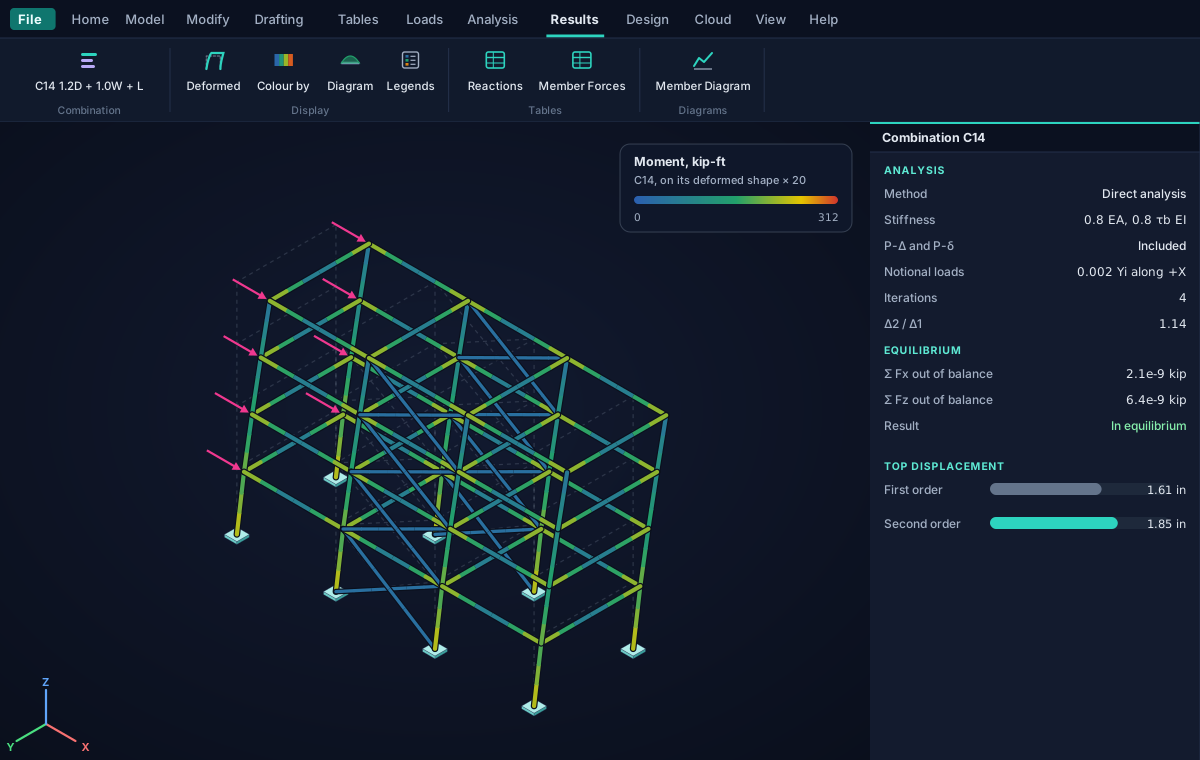
Results · Deformed shape
Illustration of a four-storey frame drawn on its deformed shape under a wind combination, coloured by bending moment, beside the combination's record: the direct analysis's reduced stiffness, its notional loads, the ratio of second- to first-order drift and the equilibrium check.

Steel design

Every steel member checked to AISC 360-22, clause by clause.

Every run designs the steel from that run's own forces: tension, compression, flexure about both axes, shear both ways, and combined forces and torsion, at points no more than six inches apart, by LRFD or ASD as each combination states.

  • The lengths a member buckles over found from the structure itself, Lcx, Lcy, Lb and Cb by Equation F1-1, or stated by you
  • Each ratio with its limit state and the clause that states it
  • Optimise: the lightest section of each group that passes, analysed again until the choice settles
  • A beam's net deflection under each service combination that states a limit, L/360 and the like
  • AISC 360-22 Ch. D to H
  • F1-1
  • E5
  • AISC Shapes Database v16.0
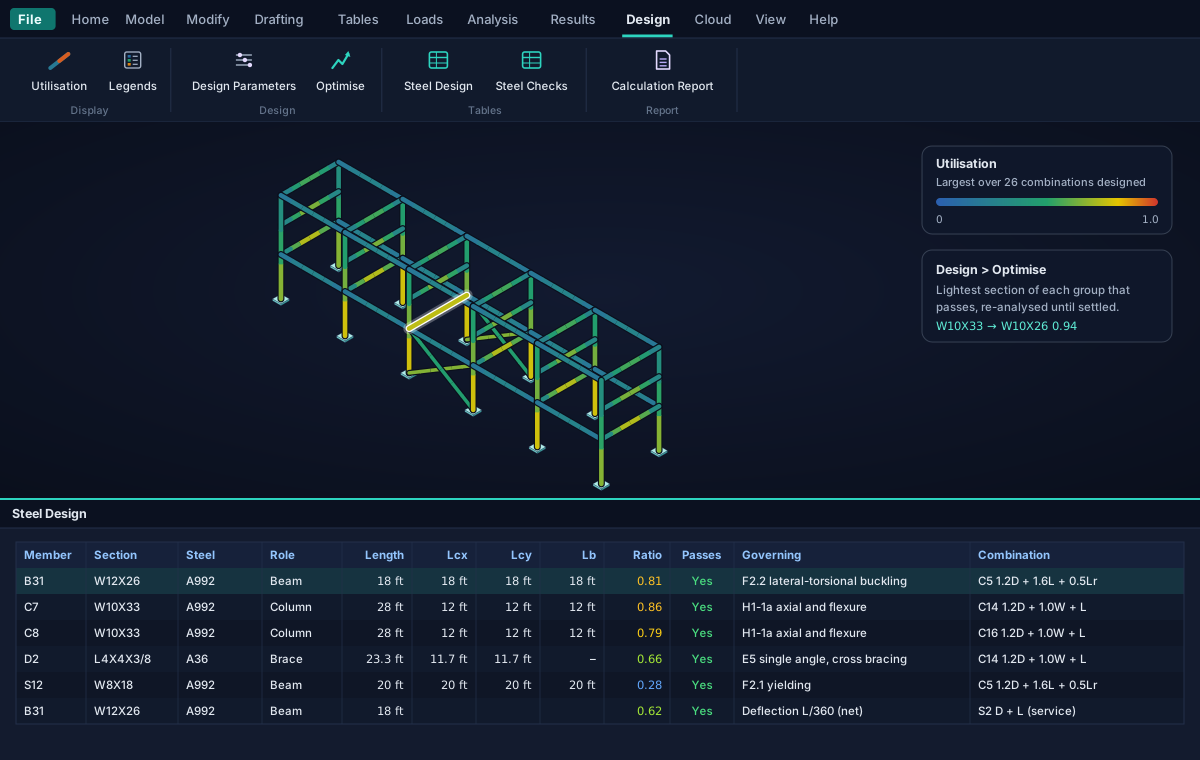
Design · Steel Design
Illustration of a pipe rack coloured by each member's AISC 360-22 utilisation, and the Steel Design table listing each member's section, steel, role, lengths, ratio, governing check with its clause and governing combination.

Results

Results you read on the model, and in tables you can sort.

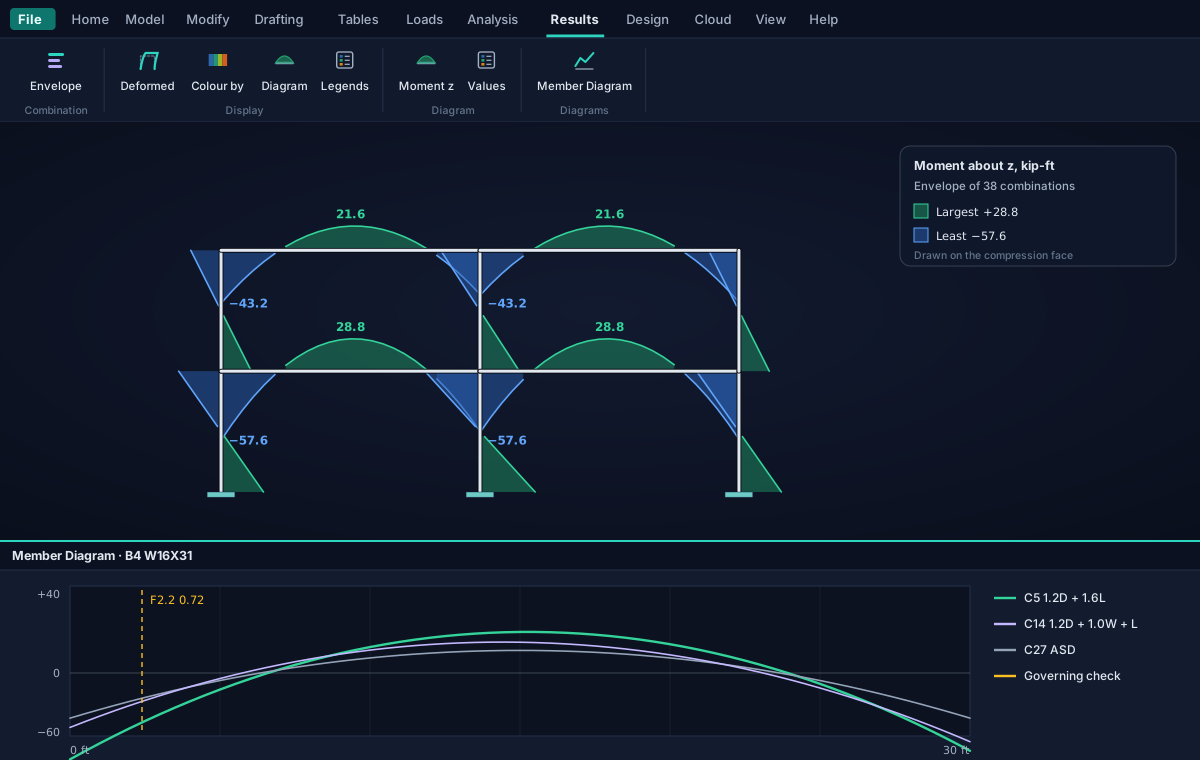
Step through the combinations on the deformed shape, colour every member by a force, or draw a force's diagram on every member at once, under one combination or as the envelope of them all, with the largest values written where they stand.

  • The Member Diagram of any member under each combination, its governing check marked along it
  • Reactions, displacements, member forces, deflections and their envelopes as sheets that sort, filter and copy
  • Results go out of date the moment you change what the analysis reads, and say so
Results · Diagram
Illustration of the bending moment envelope drawn on every member of a two-bay, two-storey frame, green where positive and blue where negative, its largest values written, above the Member Diagram of one beam under three combinations with its governing check marked.

An audit that does not trust the solver

Each combination's reactions are summed against its loads, notional loads and self-weight included, and a combination that does not balance is shown with no result.

Built for large structures

Thousands of members and hundreds of combinations, solved on every core your computer has, with a sparse solver for structures wide in every direction.

Lines, poles and substations

Weather cases by the NESC, ASCE MOP 74 or MOP 113 written as wire loads, wind on the members and combinations, and MOP 113 deflection classes checked.

Spreadsheet in, spreadsheet out

Joints, members, sections, loads and combinations are tables too: paste a block from a spreadsheet, or copy any result table out.

The calculation report, free

A PDF of the basis, the model, the loads, the combinations, the equilibrium, the reactions and every member's checks, written only from a current run.

The cloud, when you want it

Sign in for cloud jobs on any computer, shared with FoundaTrix Studio and PileAxis, with version history and a recycle bin.

Pro

Poles and H-frames, BIM export, and your firm on the report.

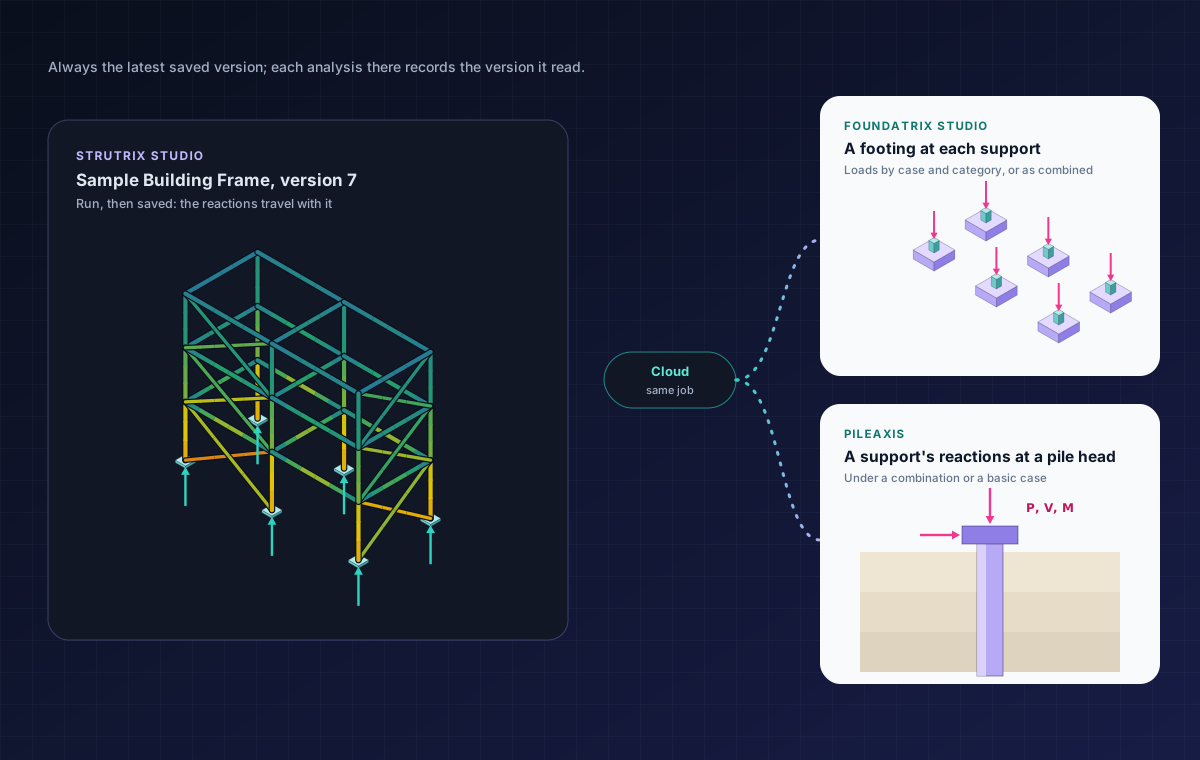
The Pro features take the work further: tapered tubular structures designed to ASCE 48-19, the designed structure sent to your BIM tools, your firm's name and logo on every page, and the link that hands your reactions to your foundations.

Free trial Sign in with an email address and every Pro feature opens for a free trial, counted from your first sign-in to Strutrix Studio. Nothing is charged and there are no in-app purchases.
Design · Tapered tubes
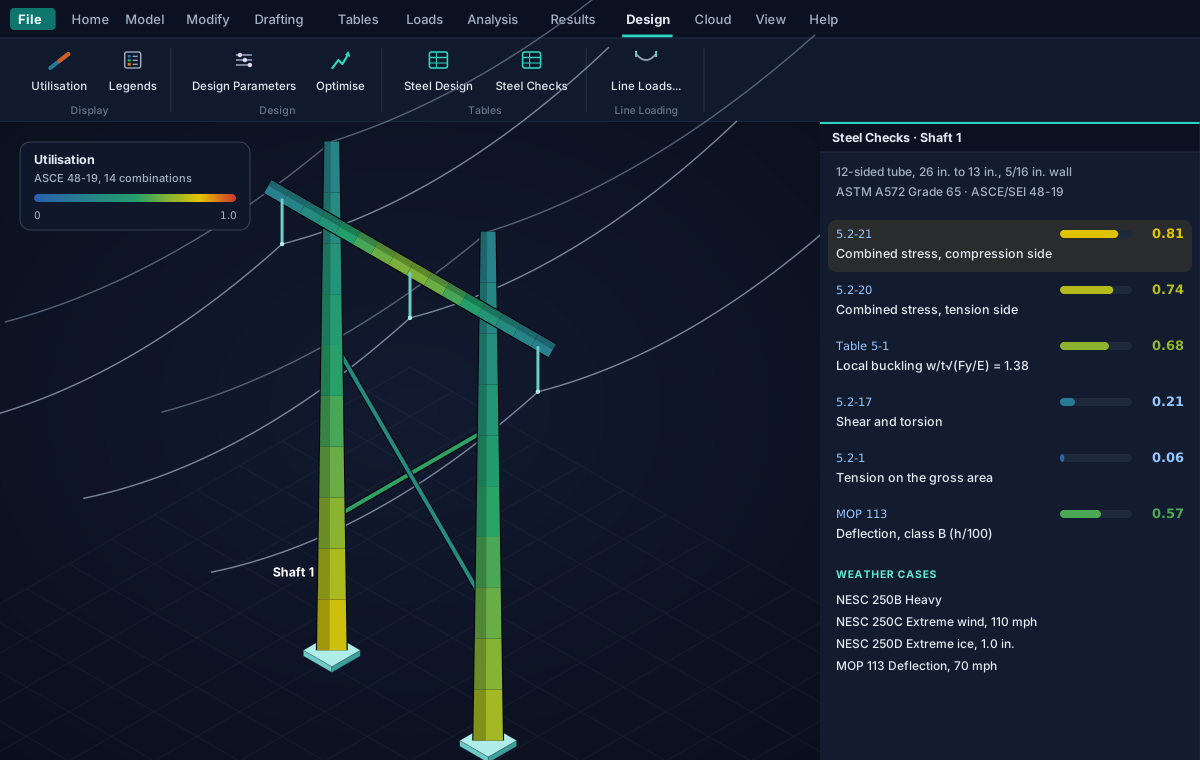
Illustration of an H-frame of two tapered 12-sided poles, a cross-arm and an X-brace carrying three conductors and two ground wires, coloured by utilisation along each tube, beside the ASCE 48-19 checks of its first shaft and the weather cases its loads came from.
Pro

Transmission poles and H-frames, to ASCE 48-19.

A section may be a tapered tube formed from plate, round or a regular polygon of an even number of flats (6, 8, 12 and 16 are usual), its diameter varying from one end of the member to the other. The analysis takes it in one-foot steps, each the tube's own section, and the design checks it at every station.

  • The sharp-cornered properties of ASCE 48-19 Appendix B, at every diameter along the tube
  • Local buckling, combined stress at every point of the section, shear and torsion, and truss members, to Chapter 5
  • Generate a pole with its shafts and davit arms, or an H-frame with its cross-arm and X-brace, wires attached
  • Optimise gives each tube the thinnest plate that passes, keeping the diameters its clearances set
Pro

IFC 4.3 and Revit, from the structure you designed.

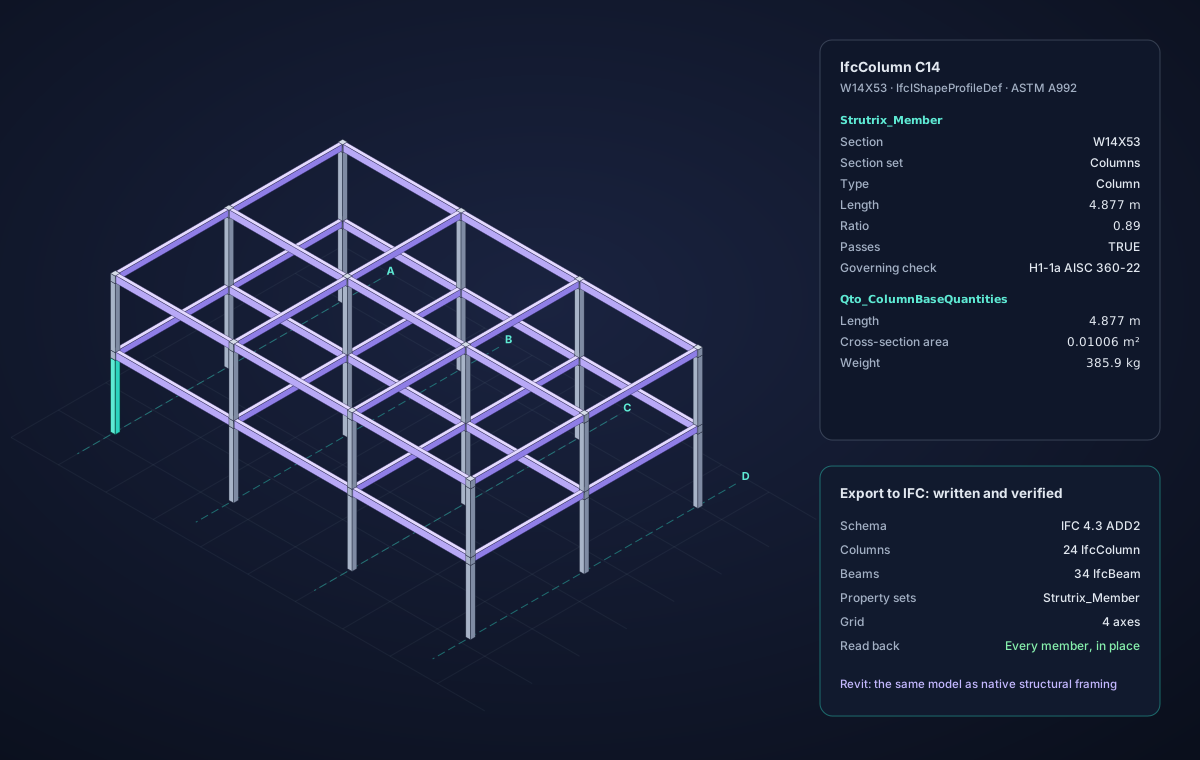
Send the structure to any BIM tool as IFC 4.3, or into Revit as structural columns and framing through the Ramisoft Revit add-in. Every member is written at its centre line as its true steel profile, turned as the analysis turns it.

  • Each member's section, set, type, length and base quantities, and its design result where the design still describes the model
  • The set-out grid, and the site's origin where you want it
  • The same identities on every export, so a coordination tool replaces a member rather than adding a copy
  • Every file read back before it replaces the last one, with a summary of what was written
File · Export to IFC
Illustration of the structure exported to IFC 4.3 in a BIM viewer: steel columns and beams on the set-out grid, the selected column's property sets with its section, length, weight and AISC 360-22 design result, and the export's summary.

Your firm on the report

Your firm's name, logo and tagline on the calculation report's cover and in every page header. The report itself is free.

Foundations and piles that read your reactions

FoundaTrix Studio and PileAxis read a saved structure's support reactions from the same cloud job. More below.

Find structures by what they hold

Ask your AI assistant for the structures in your jobs by their members, supports, combinations, height, sections or steels.

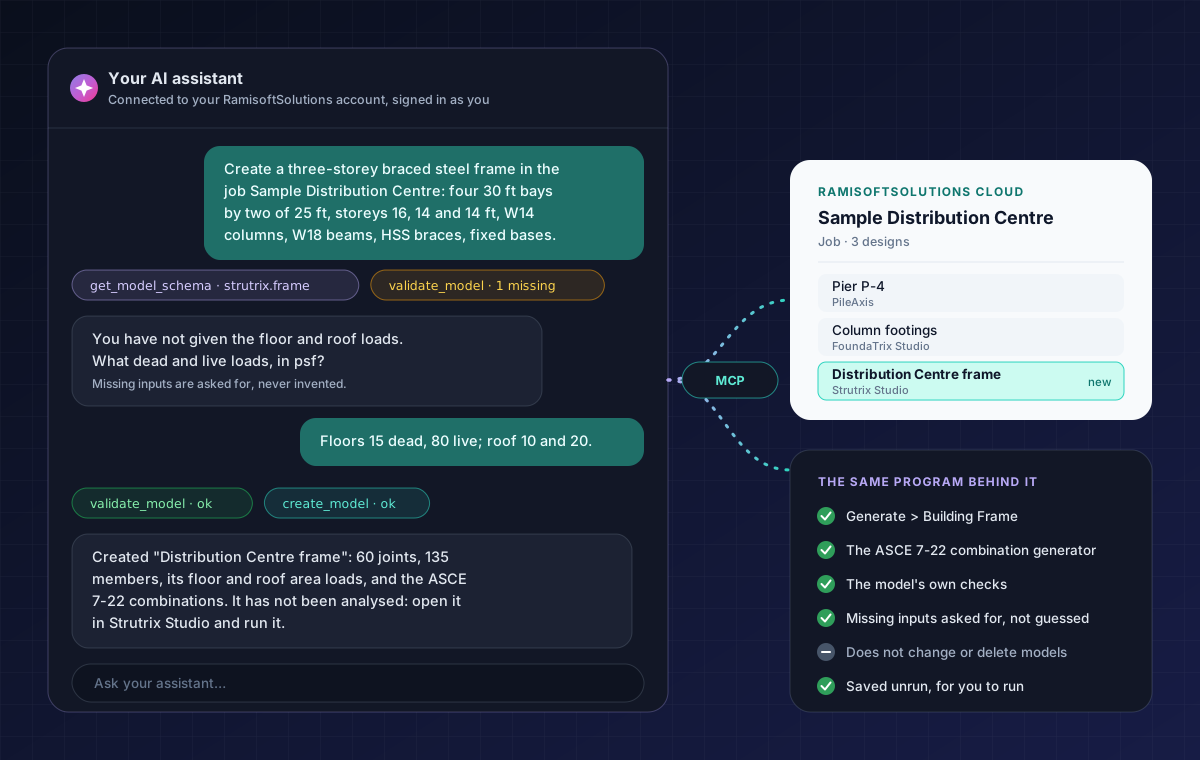
Illustration: an engineer asks an AI assistant for a three-storey braced steel frame in a cloud job; the assistant reads the model type's schema, asks for the floor and roof loads the engineer had not given, checks the model and creates it, unrun, in the job beside the job's pile and foundation designs.

Your own AI assistant

Describe the building to your AI assistant. It builds the frame.

Connect an AI assistant that accepts custom MCP connectors, Claude among them, and tell it the bays, the storeys, the sections, the supports and the loads. It creates the building frame in your cloud job with Strutrix Studio's own generators and checks.

  • Made exactly as Generate > Building Frame and the ASCE 7-22 combination generator make it
  • A value you did not give is asked for, and every value supplied for you is listed back
  • Saved unrun, in your name: open it, review it, run it and confirm the results yourself
  • It also searches the user's manual, and finds your structures among your jobs by what they hold

How to connect your assistant is explained in the program's user's manual (Help > User's Manual). It works as you, with your own account. Creating a frame needs only an account; a search by what a structure holds needs Pro.

Plans

Start free. Sign in when you want more.

The analysis and the steel design cost nothing and ask for nothing. An account adds the cloud, and a free trial of every Pro feature.

No sign-up

Free

$0no account

Everything you need to model, analyse and design a steel frame on your own computer.

  • 3D frame model, drawn or generated
  • First-order and direct analysis
  • AISC 360-22 design, LRFD and ASD, and Optimise
  • ASCE 7-22 combinations, area loads, line loading
  • The calculation report
  • Local model files, offline
Coming soon

Signed in

$0sign in with email

Everything in Free, plus the cloud, and a free trial of every Pro feature from your first sign-in.

  • Cloud jobs, on any computer
  • Version history and a recycle bin
  • One account for all three programs
  • Your AI assistant builds frames for you
  • A free trial of every Pro feature
How signing in works
Pro

Pro

Soonpricing to be announced

Every Pro feature without a time limit, for engineers and firms. Try all of it free.

  • Tapered tubes, poles and H-frames
  • IFC 4.3 and Revit export
  • Your firm on the report
  • Reactions to FoundaTrix Studio and PileAxis
  • Search by what a structure holds
Try Pro free
Coming soon

Get Strutrix Studio for Windows.

Strutrix Studio is on its way to the Microsoft Store, which will install it and keep it up to date. Free to download and free to use, with no account.

Coming soon to theMicrosoft Store

Want to know the day it arrives? Tell us and we will write once.

  • SystemWindows 10 or 1164-bit; version 2004 (build 19041) or later
  • Processorx64, several coresThe analysis uses every core it finds
  • Memory8 GB minimum16 GB for structures of thousands of members
  • GraphicsDirectX 11For the 3D view
  • Display1920 × 1080 recommendedThe ribbon fits it whole; a narrower window scrolls it
  • InternetOnly when signed inFor the cloud, the link and Pro

Feedback

Found a bug? Have an idea? Tell us in the open.

Strutrix Studio's issue tracker is public on GitHub: see what has been reported, follow what is being fixed, and vote for what should come next.

Report a bug

Something wrong, a number that looks off, a combination that will not solve? Tell us what happened and how to see it again.

Open a bug report

Request a feature

A load generator, a design code, a member type, a step it could save you. Ideas from practice shape what comes next.

Suggest a feature

Write privately

Confidential project data, engineering questions, licensing or your account: email us rather than posting in public.

admin@ramisoftsolutions.com

An engineering aid, not a substitute for engineering judgement

Results depend on the model, the loads and the criteria you enter. Members are linearly elastic and loads static; connections and base plates are not designed. Results must be reviewed by a licensed engineer before they are relied on in a stamped submittal. See the terms of use.