Features
The engineering, in detail.
What Strutrix Studio computes for a three-dimensional frame, the methods and standards it follows, how its results are checked, and where version 1 stops. The built-in manual states every method and assumption so you can verify the results yourself.
The model · Free
Joints and members, connected the way they are built.
A frame is any structure you can describe as joints connected by members, each carrying axial force, shear in two directions, torsion and bending about two axes. Global Z is up, the same vertical FoundaTrix Studio and PileAxis use, so a structure and its foundations in one job read each other's directions without conversion.
Members
FreeEntered whole, divided for you
- A member is drawn end to end; the analysis divides it at every joint on its centre line and every crossing, and reports it whole
- Crossings connect, or pass unconnected, as the model chooses (an X-brace not bolted at its middle)
- Beams, columns, vertical and horizontal braces, each type with its own drawing colour and design role; braces pinned at both ends
- Local axes from global Z or a reference joint, turned by an angle, the section drawn as the analysis bends it
- A member can be made inactive: drawn, and left out of the analysis
Boundary conditions
FreeSupports, releases and rigid parts
- Each of a joint's six degrees free, fixed, on a spring, or on a compression-only or tension-only spring
- Settlements and rotations imposed on held supports per load case
- Each member end releasing any of its six forces, or partially fixed through a rotational spring
- Rigid end offsets, results reported face to face, and rigid links tying a joint to its master
- Tension-only and compression-only members, found by iterating the set of members that work
The Studio
FreeDrafting precision in 3D
- Joints placed and members drawn on a work plane on XY, YZ or ZX, at any named elevation, with a 2D view of the plane
- Set-out grid lines with bubbles, a drafting grid laid out by spacing or listed increments, skewed if need be
- Object snaps, quarter and third points among them, typed coordinates and relative distances
- Move, copy, array, rotate, mirror and scale; split, merge, extend, trim, match properties, relabel, merge coincident joints
- Select by criteria read from the objects' own properties, and saved selections kept with the model
Sections and materials
FreeEvery property from the AISC database
- W, M, S, C, MC, L, WT, rectangular and round HSS and pipe, from the AISC Shapes Database v16.0, every property the database's own value
- ASTM A992, A572 Grade 50, A36, A500 Grade C, A1085 and A53 Grade B, or a general material of your own
- Section sets: members that share a section, a material and design rules, sized together
- A section stated by its properties alone, for a member that is not designed
Checking the model
FreeFifty checks before the first run
- Errors the analysis would refuse: a part standing on no support, a member of no length, a release set that leaves a member a mechanism, a load placed off its member
- Warnings where it would run but probably not as meant: two joints a hair apart, two members along one line, members passing close without meeting, a joint nothing holds along an axis, a load drawn twice
- Each finding coded and listed in the Validation pane, the joint or member it names selected with a click, every distance in your units
Loads · Free
Every load applied exactly where it acts.
Loads are entered in basic load cases, as many as the structure needs, each in its ASCE 7-22 load category: dead, live, roof live, snow, rain, wind or earthquake. A lateral case is reversible along an axis, as an earthquake is, or one way, as a wind case is.
Kinds of load
FreeAt joints, along members, over areas
- Joint forces and moments; member point loads and moments, in global or local axes
- Uniform or linearly varying loads over all or part of a member, per length or projected, so snow per unit of plan puts nothing on a column
- Thermal loads: a uniform change, and a difference between opposite faces
- Self-weight from each section's area and its material's unit weight, with a factor along each axis
- A load inside a member is never moved to a joint: its effect on the member's ends is found exactly
Area loads
FreeA pressure over a region, spread to its members
- Regions cornered at joints, so they move with the frame, on a floor, a roof or a wall
- One way, in the span you state, or two way, each side taking the part of the panel nearest it
- Delivered as exact distributed loads; what the members carry sums to the pressure times the area
- A side of a panel with no member on it reported with the load it would have carried
Load combinations · Free
ASCE 7-22, written out for you, traced to its rows.
A combination is a list of terms, each a basic case, a whole category or another combination, with a factor. Each states whether it is solved, how it is analysed, its basis (LRFD, ASD or service), its notional loads and whether the steel is designed from it.
The generator
FreeSections 2.3 and 2.4, every choice expanded
- Strength and allowable stress combinations for the categories the model uses, atmospheric ice when asked
- "Lr or S or R" made one combination per choice, each lateral case in each of its senses
- The redundancy factor ρ, the vertical seismic effect Ev = 0.2 SDS D and the orthogonal 100%/30% rule when asked
- Service combinations for deflections, and a row that repeats another left out and counted
- Each named after its row and direction:
ASCE 7-22 2.3.1 5a, W -X, notional -X
Notional loads
FreeOut-of-plumbness, from the combination's own gravity
- Ni = 0.002 α Yi at every level, α = 1.0 for LRFD and 1.6 for ASD
- Every downward load given a horizontal twin where it stands, so each level's notional load is its own gravity load's
- Gravity-only combinations written in four directions; wind and earthquake combinations in the direction of their load
- The permission of C2.2b(d) to limit them to gravity combinations, offered as a choice that is yours to justify
Analysis · Free
The stiffness method, to first or second order, per combination.
The whole structure's stiffness is assembled from its members and factorised once; every basic case is a substitution and every first-order combination a weighted sum. A combination marked for second order is solved on its own, because second-order results do not add.
Direct analysis
FreeAISC 360-22 Chapter C, as written
- Each member cut into short pieces with the stiffness its axial force gives it: P-Δ and P-δ both included
- 0.80 times the axial, shear and torsional stiffness and 0.80 τb times the flexural stiffness, τb from each member's own axial force
- Iterated until the axial forces and the stiffness agree; a structure that buckles is reported unstable, naming where
- ASD analysed at 1.6 times the combination and divided back, as Section C2.1(d) requires
- Or an elastic second-order analysis at full stiffness, for the actual displacements under factored loads
One-way members and supports
FreeWhat works, found by iteration
- A tension-only brace compressed, or a compression-only strut pulled, lets go for the next pass; one that has let go takes hold again when its ends move back
- Compression-only springs for a footing that may lift, tension-only springs as their mirror
- The passes repeat until nothing changes, and the result lists what let go
- A structure left unable to stand is reported unstable, naming what let go
The equilibrium audit
FreeEvery combination checked against statics, independently of the solver
- The reactions summed against the loads, notional loads and self-weight included, in force and in moment about the origin
- A combination passes when what is left is no more than a millionth of the larger of its loads and its reactions
- One that fails is reported and shown with no result: this is what tells you a result is in equilibrium, rather than that a solver stopped
- Results belong to the model they came from: any change the analysis reads puts them out of date until the next run
Results · Free
Nothing interpolated between joints.
A member's forces and deflections are reported at its joints and at points between them no more than six inches apart, each exact for the analysis. The forces follow by statics from the member's end forces and its loads; the deflections by integrating its curvature in closed form. In a first-order combination, each force's largest and least value along a member is found exactly, wherever it falls.
- The deformed shape of any combination, magnified as you choose, and each member coloured by its axial force, shear, torsion, moment or deflection
- Any force's diagram drawn on every member at once, a moment on its compression face, under one combination or as the envelope of them all, with the values written
- The Member Diagram of one member: its six forces along it under each combination, and their envelope
- Reactions, displacements, member forces, deflections with L/Δ, and the reaction and member envelopes with the combination that gave each value
 Results · Diagram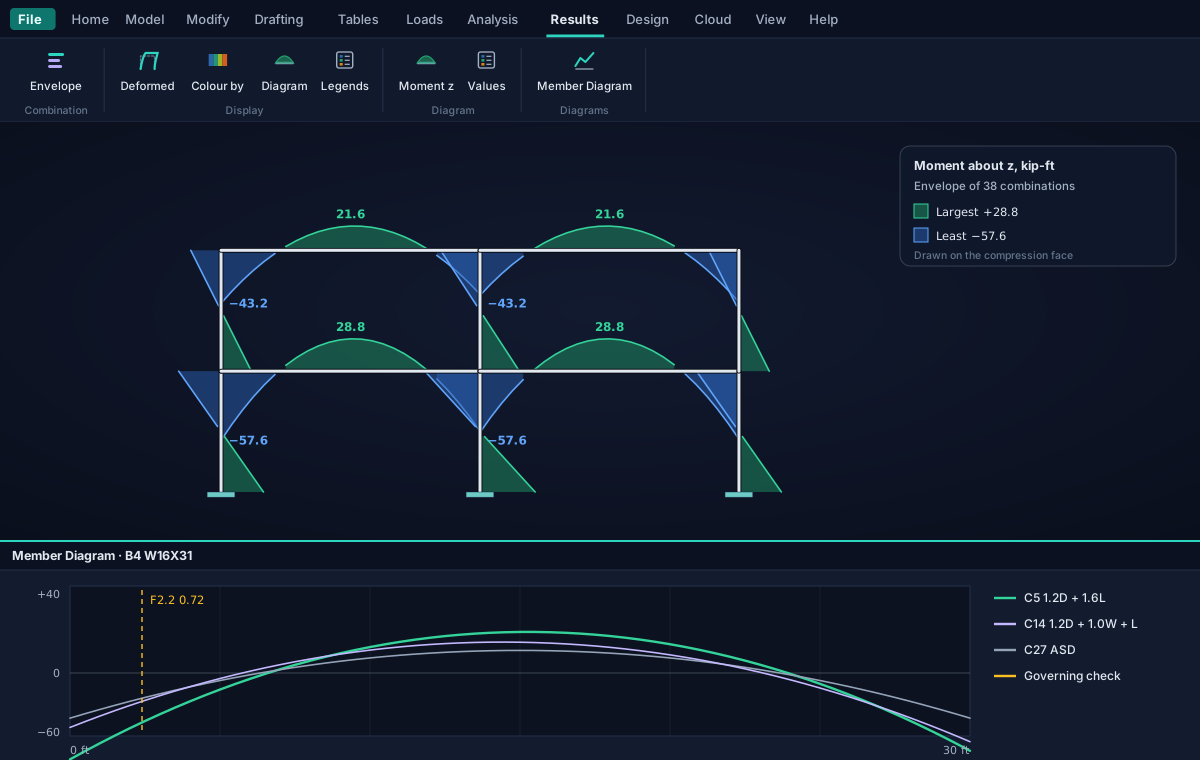
Steel design · Free
AISC 360-22, LRFD and ASD, at every station.
Every run designs the steel from that run's own forces, at the very points the results report, so a design never analyses the structure again. A steel design is made from combinations analysed by the direct analysis method, so the required strengths include second-order effects and K is 1.0.
What is checked
FreeChapters D to H, clause by clause
- Tension (D), compression (E), flexure about both axes (F), shear both ways (G), combined forces and torsion (H)
- Every ratio with its limit state and its clause; a member's governing check is its largest under any combination
- Each combination designed by its own basis, so a model may carry LRFD and ASD combinations at once
- A single angle in an X panel checked as cross bracing (E5)
Lengths
FreeUnbraced lengths found from the structure
- A member is held where another member or brace frames in and reaches a support by another way
- Lcx and Lcy across its own local axes, the torsional length, and Lb segment by segment
- Cb by Equation F1-1 from each segment's quarter-point moments; 1.0 out to a free end
- Any of them stated member by member instead, in the Design Parameters table
Choosing sections
FreeOptimise: the lightest that passes
- For each section set marked Optimise, the lightest of its group (every W16 for a W16X26) that passes every check
- The structure analysed again with what was chosen, until an analysis changes nothing
- A set that has grown is never made lighter again, so the choice cannot go back and forth
- Nothing applied until you say so, then as one step you can undo
Deflection
FreeNet deflection, as a beam deflects
- Each beam under each service combination that states a limit, L/360 or as you set
- Measured against the points that hold it, so a settling support or a swaying frame is not counted against the beam
- A member that fails drawn whole in the colour of its ratio
- ASCE MOP 113 deflection classes A, B and C for substation structures
Pro
Tapered tubular poles, to ASCE 48-19.
A transmission pole's shaft, an H-frame's poles and a davit arm are tapered tubes braked from plate. Strutrix Studio analyses them as the tubes they are and checks them by ASCE/SEI 48-19, or a round tube by AISC 360-22 if you choose.
Design · Tapered tubes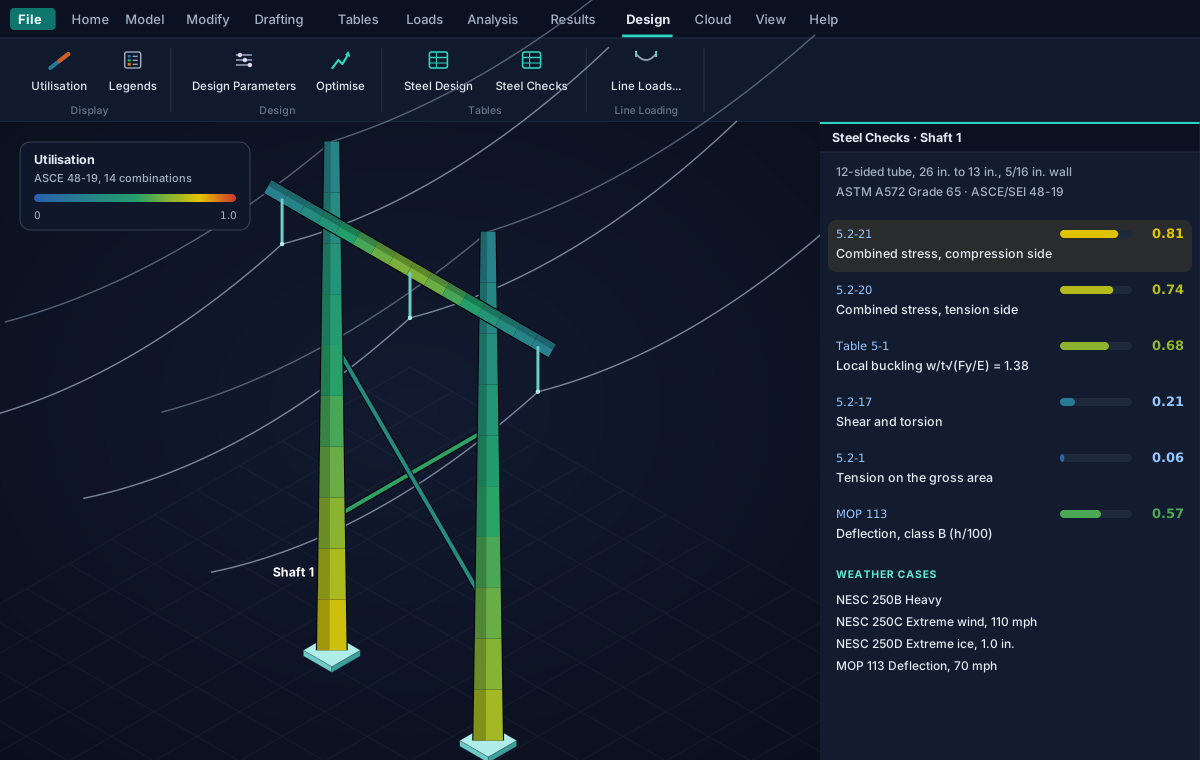
The tube's own section, at every station.
- Round, or a regular polygon of an even number of flats, the diameter varying in a straight line from base to tip
- Sharp-cornered properties by ASCE 48-19 Appendix B; the analysis in one-foot steps, each the tube's section at its middle
- Local buckling by Table 5-1, the combined stress at every point of the section with the shear where it acts, tension, bending, shear and torsion, and truss members
- Under every strength combination analysed second-order, on factored loads, every check citing its equation
- Generate a pole in shafts with slip joints and davit arms, or an H-frame with its cross-arm and X-brace, wires attached
- Optimise gives each tube the thinnest plate that passes, keeping its diameters
Line loading · Free
The loads a line puts on its structure, by its standard.
From three tables, the weather cases, the wires and each wire's tension in each weather case, the line loading writes the load cases, the loads and the combinations a transmission line puts on a pole, an H-frame or a substation structure. What it writes is ordinary loads you can read, change or delete.
NESC
IEEE C2-2023
Rule 250B's combined ice and wind districts, Rule 250C's extreme wind and Rule 250D's extreme ice with concurrent wind, by grade of construction.
ASCE MOP 74
Line structural loading
Wind at the speed of the return period chosen, and radial glaze ice with concurrent wind.
ASCE MOP 113
Substation structures
Extreme wind and ice with concurrent wind, combined by Table 3-18 or 3-19, and the deflection loading its classes are checked under.
Wires and insulators
Conductors and ground wires with their diameters, weights, bundles, spans, line angle and insulators, attached at joints.
Wind on the members
Each weather case's wind on the structure's own members, by height above the ground, with the exposure and topographic factor.
Any yaw
The wind's angle to the line from square to along it, and wind both ways reversed through 180 degrees.
Reports and data
Your structure, in the formats you already use.
The calculation report · Free
A report that says how, as well as how much.
One PDF, written from the current run and its steel design and from nothing else: after an edit to anything the analysis reads, it asks you to run again, so a report never describes a structure other than the one analysed.
- The basis of analysis and design in words, with its clauses, and the standards on the cover
- The model, the loads, the combinations, each combination's equilibrium and every support's reactions
- Every member designed, and each member's limit states clause by clause at their worst
- Letter, Legal or A4, in your units; your firm's name and logo on every page with Pro
Calculation Report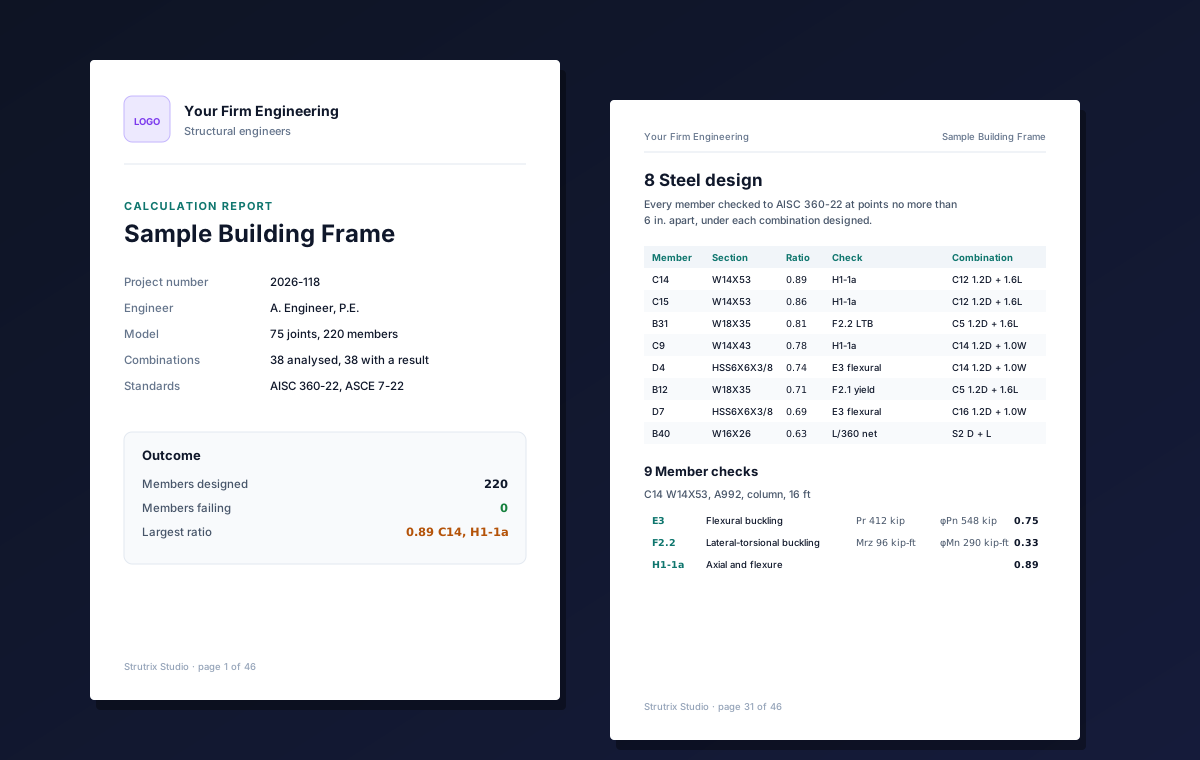
IFC 4.3 and Revit
Every member as its true steel profile at its centre line, with its properties, quantities and design result; into Revit as structural columns and framing through the Ramisoft Revit add-in.
Tables like a spreadsheet
Joints, supports, members, sections, materials, loads and combinations as sheets that sort, filter, paste and copy; an object's properties are its rows.
Plain-text models
One .strx file per model, readable and easy to keep under version control or send to a reviewer.
Units, formulas, undo
Imperial or metric at any time; a formula after = in any number field and lengths in feet and inches; undo that reaches back past a save.
The manual, built in
Help > User's Manual opens the whole methodology beside your work: every assumption, method, equation and check, and the limits of version 1.
Settings that stay
How the model is drawn, its colours by member type, the deformed shape's magnification, the editing tolerances and the report's paper, for every model.
Cloud
Optional, never required.
Local model files are the default and work offline without an account. Sign in when you want your structures on any computer, in the same jobs as your foundations and piles.
Cloud jobs
Save a structure to a job with a searchable description, and open it on any computer you sign in on. A job may hold structures, foundation models and pile designs side by side.
Version history
Every save is a version with who saved it and why; restore any of them as a new version, so a restore can itself be undone.
Recycle bin and check-out
Deleted designs wait thirty days where you can restore them; in a job shared with your organization, a model is checked out to whoever has it open.
Pro · The structure link
Reactions handed to your foundations, live.
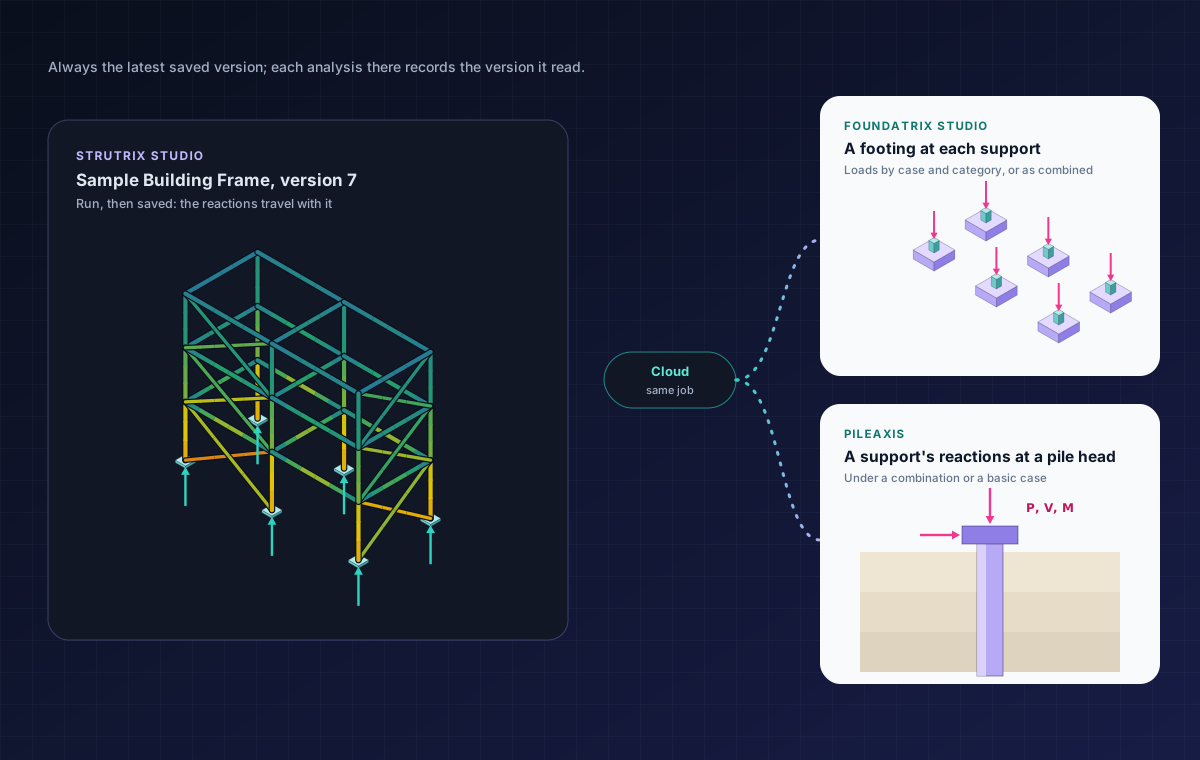
A save after a run carries each support's reactions under each basic case and each combination solved. FoundaTrix Studio and PileAxis, in the same job, read them as their loads, always from the latest saved version, and keep no copy.
- FoundaTrix Studio: each support's reactions by basic case, grouped by category and combined by its own foundation combinations, or your combinations as they are; and a footing placed at each support
- PileAxis: one support's reactions, under a combination or a basic case, as the loads at a pile's head
- Each analysis there records the version it read, and says so when the structure has changed since
- A structure changed since its run is saved without reactions, so nothing ever reads reactions of another model
Reading a structure is a Pro feature of FoundaTrix Studio and PileAxis and needs a Strutrix Studio subscription or trial as well.
Your own AI assistant
A building frame from a few sentences.
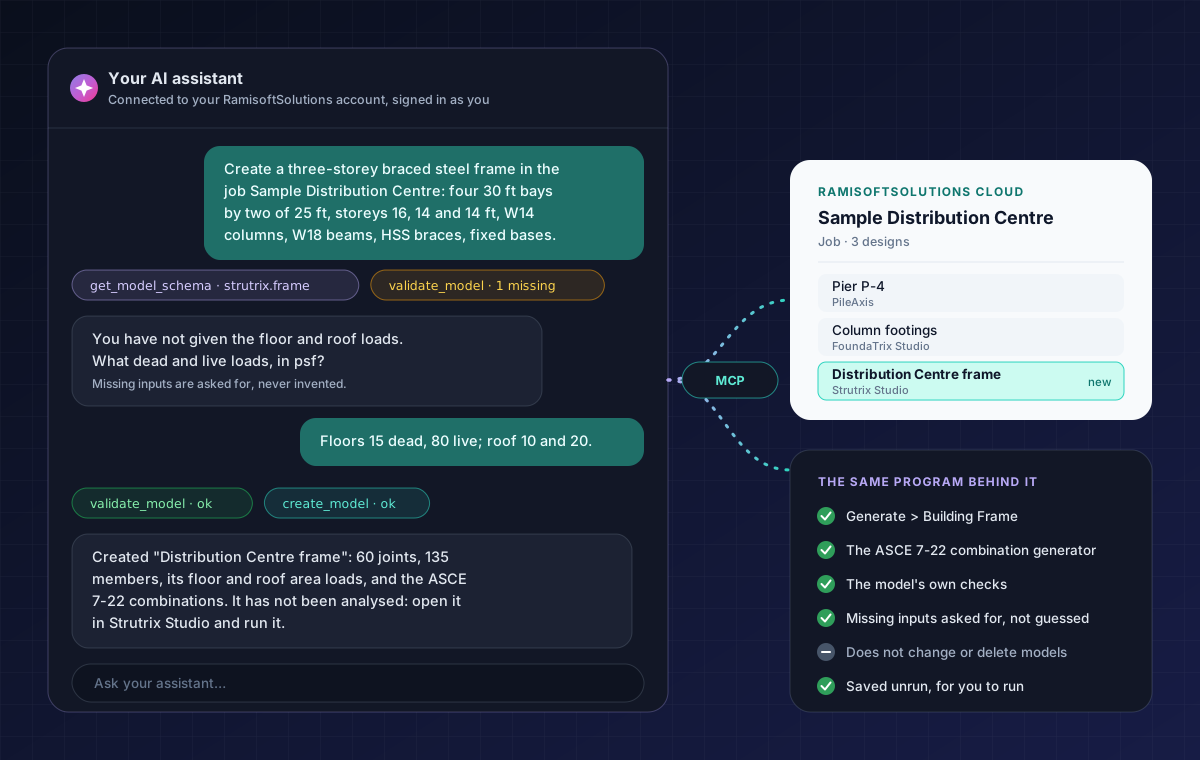
Connect an AI assistant that accepts custom MCP connectors to your RamisoftSolutions account and tell it the bays, the storeys, the sections, the steel, the bases and the floor and roof loads. It creates the frame in your job with the program's own generators and checks.
- A column at every grid point, beams both ways at every level, the end bays braced if asked
- A dead case carrying the members' own weight, live and roof live cases, each level's load as one two-way area load
- The combinations generated, and the beams' deflection limits on the service combinations
- Saved unrun, in your name; a value you did not give is asked for, never invented
- It also searches this program's user's manual, and finds your structures by what they hold
How to connect your assistant is explained in the program's user's manual. It works as you, with your own account; how it read what you gave it is its reading, so check the model as you would a colleague's. A search by what a structure holds needs Pro.
Limits
What version 1 does not do, said plainly.
So you know what still needs doing elsewhere. The user's manual lists every assumption and every limit.
Members only
No plates, walls or solids. A floor or a wall is represented by the loads it delivers to the members.
Static and elastic
No modal, response-spectrum or time-history analysis, and no material nonlinearity: members are linearly elastic, with small displacements.
No building wind or seismic generators
Wind and earthquake load cases on a building are entered as loads; the line loading writes a line's wind on its wires and structure.
Direct analysis for design
The amplified first-order method of Appendix 8 is not offered: a strength combination analysed to first order is not designed, and the program says so.
Steel members only
No concrete, wood, cold-formed steel or aluminium design, and no connection or base plate design.
No sag-tension
A wire's tensions are the line designer's. No guys, broken-wire or construction cases, and no lattice towers.
Validation
Pinned to answers it did not write.
Every result is held to an independent answer, a closed form, a published benchmark or a worked example, by an automated test, never to the program's own earlier output alone.
AISC Commentary
Second-order benchmarks
The second-order analysis reproduces the Specification Commentary's benchmark problems for a cantilever column and a pinned column under axial load and lateral load.
AISC Design Examples
Member strengths
Checks against the Design Examples' LRFD and ASD columns: a W18X50 braced at its third points gives φMn of about 307 kip-ft where the example, rounding Cb, prints 305.
Closed form
Supports and releases
A fixed-ended beam whose support settles carries 12EIΔ/L³ and 6EIΔ/L²; one that turns, 4EIθ/L and 2EIθ/L; a determinate one tilts and carries nothing.
Statics
Equilibrium, every time
Every combination's reactions balance its loads within a millionth of their size, and a printed report's reactions are held to the loads its factors put on the frame, worked by hand.
ASCE 48-19
Tube properties
The closed forms of Appendix B held to an independent integration of the outlines, and to every round HSS of the AISC database.
Citations
Every check names its clause
A design check written without the clause it comes from fails a test, so every ratio you read can be traced to the page.
References
The documents behind the checks.
- ANSI/AISC 360-22 (2022). Specification for Structural Steel Buildings. American Institute of Steel Construction.
- AISC (2023). Steel Construction Manual, 16th ed., and the AISC Shapes Database, version 16.0.
- AISC Design Guide 28. Stability Design of Steel Buildings.
- ASCE/SEI 7-22 (2022). Minimum Design Loads and Associated Criteria for Buildings and Other Structures. American Society of Civil Engineers.
- ASCE/SEI 48-19 (2019). Design of Steel Transmission Pole Structures. American Society of Civil Engineers.
- ASCE (2020). Electrical Transmission Line Structural Loading, Manual of Practice No. 74, 4th ed.
- ASCE (2023). Substation Structure Design Guide, Manual of Practice No. 113, 2nd ed.
- IEEE C2-2023. National Electrical Safety Code. Institute of Electrical and Electronics Engineers.
Run a frame you already know the answer to.
When Strutrix Studio arrives in the Microsoft Store, download it free, with no account, and check it against a case you trust. Then sign in to try the Pro features free.